5 minute read · Ultimo Research Desk · Reviewed 5 Sept 2026
How to close all or part of a position in MetaTrader 5
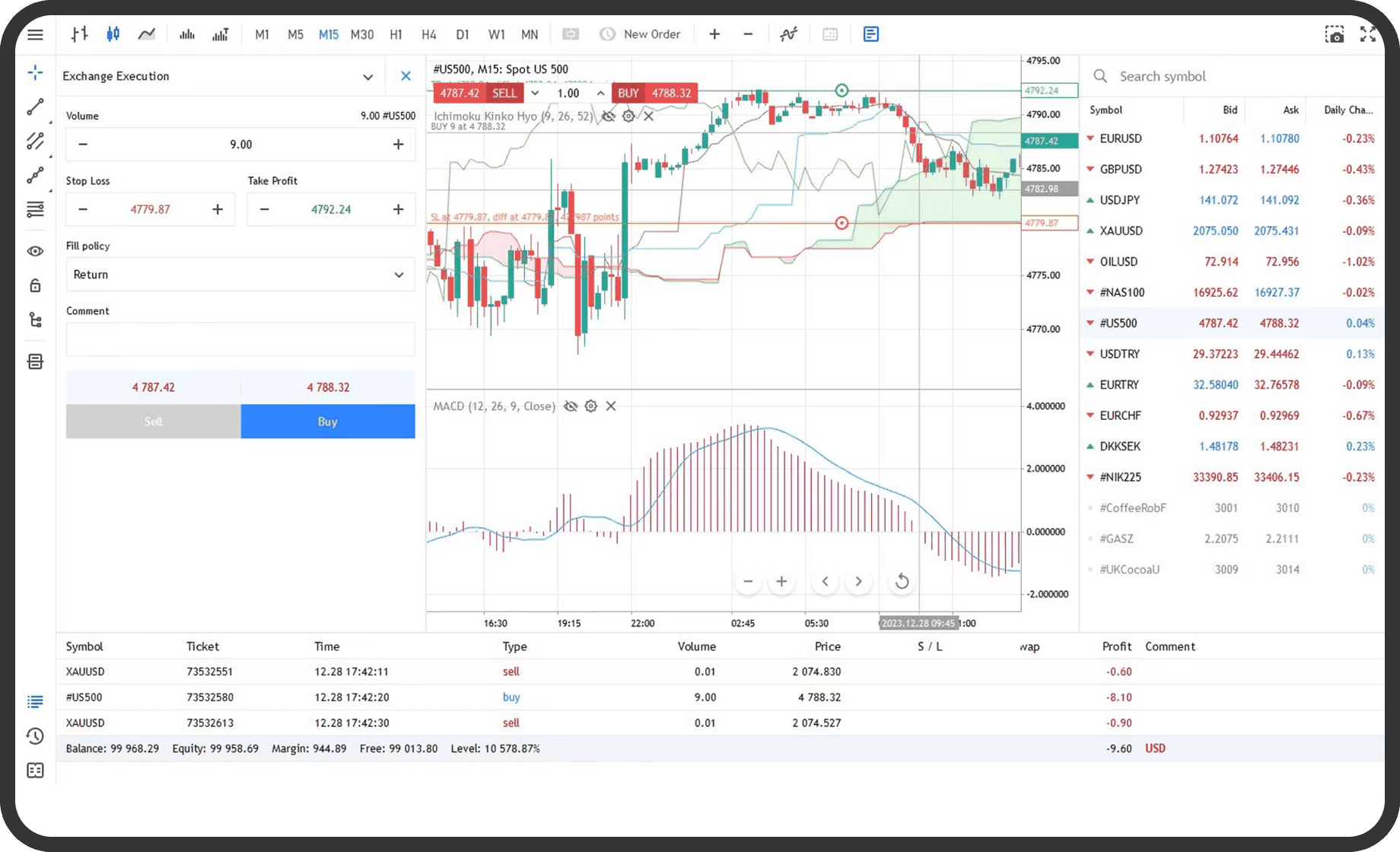
You can close an entire position, reduce only part of its volume or use group operations to close several positions in MetaTrader 5. You need an open position and a connected terminal; the exact result depends on whether the account uses netting or hedging and whether a FIFO closing rule is enabled.
Before you start
Check the Trade tab and identify the symbol, direction and volume. On a netting account, there is one position per symbol, so an opposite deal reduces the position and a deal with the same direction increases it. On a hedging account, several positions can exist for the same symbol, and you select the specific position to close. The account's position system is set by the broker.
Check the symbol's Specification for Trade, Execution, volume limits, trading sessions and any restrictions. A broker can also apply a FIFO rule on a hedging account. In that case, positions must be closed in the order in which they were opened. MetaQuotes explains these differences in Closing Positions.
On desktop
- Open the
Toolboxwindow and select theTradetab. - For one position, double-click its row or open its context menu and choose
Close Position. - To close all of the selected position, leave its full volume in the
Volumefield. To close only part, replace it with the volume to close. - Review the direction and current price shown by the close window.
- Click
Close.... InRequest Executionmode, request the price first if the dialog requires it. - Check the
Tradetab. A fully closed position should disappear from the open-position list. A partial close should leave the remaining volume.
To close groups, open the context menu for the Trade section and choose Bulk Operations. The available commands depend on the account type and selected position. Commands can include Close all positions, Close all profitable positions, Close all losing positions, and, after selecting a position, Close all positions for the symbol. Some group operations require One Click Trading and may not be available under a FIFO rule.
On a hedging account with opposite positions, Close By can close two opposite positions against each other. Open Close Position, select Close By in the Type field, select the opposite position and click Close. This command is only available where the account and platform support it.
In the web terminal
- Open the position list and select the position.
- Use the web terminal's close command.
- Select the full volume or edit the volume field for a partial close, if the field is available.
- Confirm the close and check the position list for the remaining volume.
The web terminal supports closing open trades and the available operation depends on the account's netting or hedging mode. Its layout and context menu can differ from desktop. If a partial-volume field is not shown, use the close workflow provided for that position or contact support for the supported operation.
On mobile
- Open the
Tradetab. On iPhone it is in the bottom panel. On Android, open the side panel and selectTrade. - Tap the position, or swipe its row from right to left to open the commands.
- Choose
Close Positionor the close command shown in the context menu. - In the close screen, leave the full volume to close everything or enter a smaller permitted volume for a partial close.
- Confirm the close and return to
Tradeto see whether the position is gone or reduced.
The iPhone and Android layouts differ, but both provide position commands from the Trade list. On a hedging account, select the specific position before closing it. The mobile app can also close a position from Depth of Market where that feature is available.
What happens next
MetaTrader 5 sends an opposite trade operation for the volume being closed. A full close removes the position. A partial close leaves a position with the difference between its original volume and the closed volume. On a netting account, the resulting position remains the same direction if the opposite volume is smaller, becomes flat if it is equal, or reverses if it is larger.
The completed operation appears in History as an order and a deal. The history record includes the execution time, volume, price, direction, position reference and any financial result. The current position row may remain visible briefly while the server response arrives, so check the ticket and updated volume rather than relying only on the chart.
Common problems
- The close command is rejected: the terminal is disconnected, the symbol is outside its trading session or trading is restricted. Check the connection and
Specification. - Partial volume is not accepted: the value is below the minimum, above the current position volume or not aligned with the volume step. Check the symbol specification.
- The wrong position closes: on a hedging account, a separate position was selected. Reopen
Tradeand use the ticket and open price to select the intended row. - A group close stops part-way through: one request returned an error, the account is subject to FIFO, or the terminal was closed. Check
TradeandHistorybefore sending another close request. - A close price differs from the chart price: the close uses the permitted side of the market and the available execution price. Confirm the actual price in
History.
Related
Next: How to read the account line in MetaTrader 5.
If you cannot complete the step, contact support with the symbol, the order type and a screenshot of the message MetaTrader 5 shows.
Written by the Ultimo Research Desk and checked against our own contract specifications and client agreement before publication; reviewed again when those change. Educational only — nothing here is a recommendation to trade. Spotted an error? Tell us.