4 minute read · Ultimo Research Desk · Reviewed 5 Sept 2026
How to read the account line in MetaTrader 5
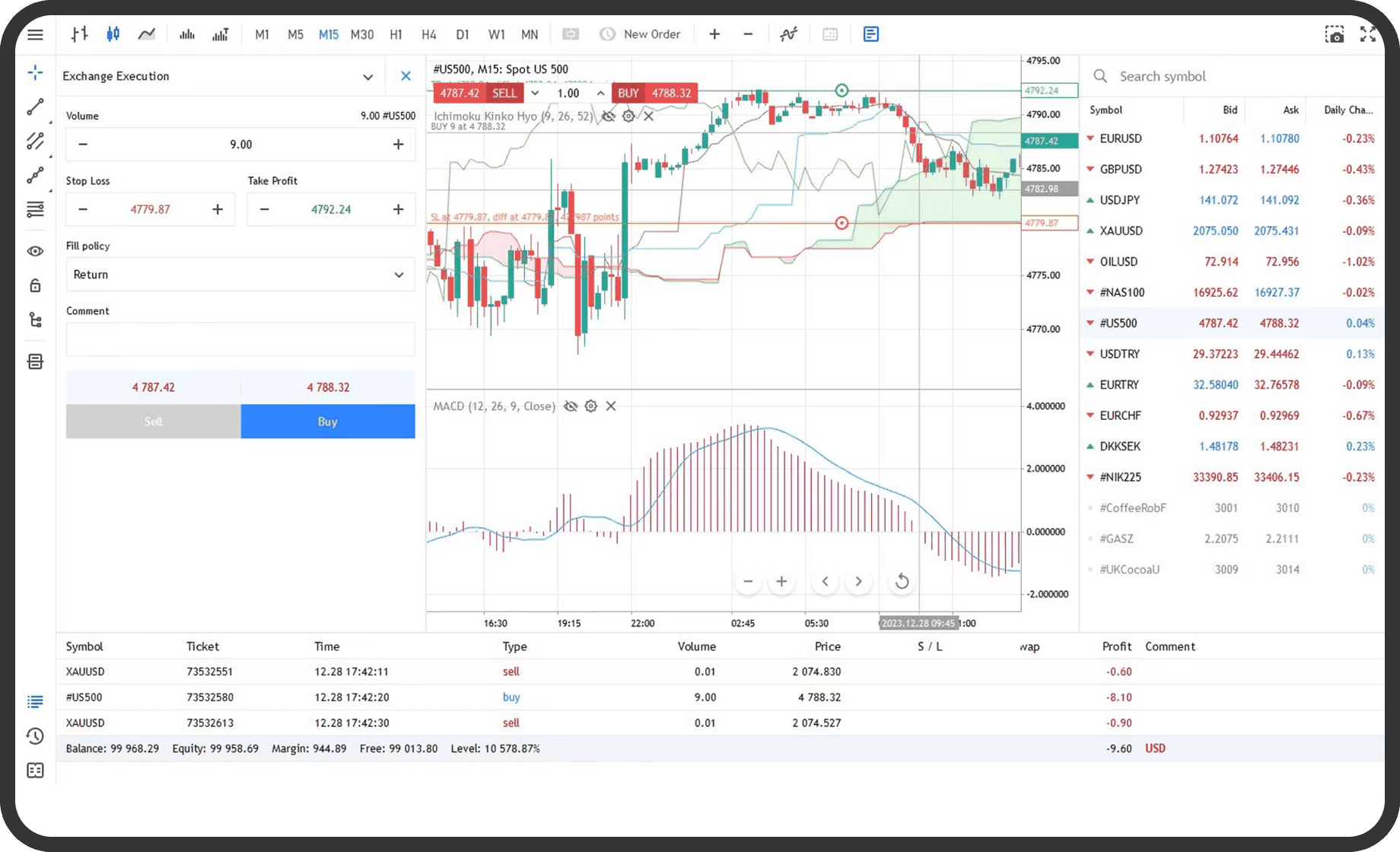
You can use the account line in MetaTrader 5 to see the account's balance, floating result, equity, used margin, free margin and margin level. You need to be logged in to the correct account; the calculation of margin and the treatment of floating values can depend on the account's broker configuration and position system.
Before you start
Close any other account connection and check the account number or login shown by the terminal. Open the symbol's Specification window if you need to understand why margin is required for a particular position or pending order. The fields Calculation, Contract size, Margin currency, Trade, Execution, volume limits and margin settings are determined for each symbol.
The account line is a live summary, not a statement of completed transactions. Balance excludes the result of open positions. Equity includes the current floating result and other account adjustments. A broker can determine which floating values, credits, commissions or blocked amounts are included in the calculation. MetaQuotes describes the account state in Basic Principles.
On desktop
- Open the
Toolboxwindow. If it is hidden, use theViewmenu or the platform window control that opensToolbox. - Select the
Tradetab. - Read the account line below the position and order lists.
- Read
Balanceas the account value excluding the current result of open positions.Credit, if present, is shown separately. - Read
Equityas the account value after the current floating profit or loss and applicable account adjustments are included. - Read
Marginas the funds required for open positions and, where applicable, pending orders. - Read
Free Marginas the equity remaining after the displayed margin is deducted. - Read
Margin Levelas the platform's equity-to-margin measure. The platform displays it as a percentage when the account has margin in use.
The account line can also show assets, liabilities, commission, blocked funds, profit and other fields depending on the account and server. Do not compare the line with a separate statement without checking the same account, time and currency basis.
In the web terminal
- Open the account or trading panel in the web terminal.
- Locate the account summary associated with the open positions and orders.
- Read the displayed balance, equity, margin, free margin and margin-level fields.
- Open the symbol's details or specification control when you need to check how a particular instrument contributes to margin.
The web terminal shows account and position information, but the placement and names of summary fields can vary with the web layout. The underlying concepts remain the same. If a field is not displayed, use the desktop or mobile account view for the fuller account summary.
On mobile
- Open the
Tradetab. On iPhone it is in the bottom panel. On Android, open the side panel and tapTrade. - Read the account summary shown above or below the position list.
- Identify
Balance,Equity,Margin,Free MarginandMargin Level. - Tap a position if you need to separate the position's floating result from the account total.
On iPhone and Android, the navigation layout differs but the account summary includes the same main fields. Mobile can also show Credit, Assets, Liabilities, Commission, Blocked, Profit and Total of deals, depending on the account configuration.
What happens next
The account line changes when a quote changes, a position is opened or closed, a pending order affects margin, or an account adjustment is posted. A simplified relationship is: equity equals balance plus or minus the floating result, with applicable credit, commission and blocked amounts included according to the server's rules. Free margin is equity minus margin. Margin level is equity divided by margin, multiplied by 100, when margin is in use.
The figures are not the same as a trade history report. The Trade tab shows the current state. The History tab records completed orders and deals. If the line appears inconsistent, first confirm the account, symbol, open positions, pending orders and the calculation fields in Specification.
Common problems
- Balance and equity differ: an open position has a floating profit or loss, or an account adjustment is included in equity. Check the position rows and account summary.
- Free margin is lower than expected: open positions or pending orders require margin, or floating losses reduce equity. Check the
Margincolumn and symbol specification. - Margin level is blank or unavailable: no margin is currently in use, or the account server does not provide the field in that view. Check the desktop
Tradetab. - Different terminals show different figures: the terminals are connected to different accounts, quote updates are delayed or one view has not refreshed. Confirm the login and connection.
- Margin changes after opening an order: the symbol's price, volume, calculation method or margin rules affect the required amount. Check the current
Specificationwindow.
Related
Next: How to check a symbol's contract specification in MetaTrader 5. What happens when margin level falls is explained in What is a margin call; the margin calculator shows the margin a position will require.
If you cannot complete the step, contact support with the symbol, the order type and a screenshot of the message MetaTrader 5 shows.
Written by the Ultimo Research Desk and checked against our own contract specifications and client agreement before publication; reviewed again when those change. Educational only — nothing here is a recommendation to trade. Spotted an error? Tell us.